
Spigen Glas.tr Slim ROG Ally / Ally X 2023-2025 / MSI Claw 7 AI+ Clear [2 PACK]
![Spigen Glas.tr Slim ROG Ally / Ally X 2023-2025 / MSI Claw 7 AI+ Clear [2 PACK] - 1](/_next/image?url=https%3A%2F%2Fpresta.homescreen.pl%2Fimg%2Fp%2F8%2F4%2F1%2F3%2F1%2F9%2F841319-thickbox_default.jpg&w=1200&q=75)
![Spigen Glas.tr Slim ROG Ally / Ally X 2023-2025 / MSI Claw 7 AI+ Clear [2 PACK] - 2](/_next/image?url=https%3A%2F%2Fpresta.homescreen.pl%2Fimg%2Fp%2F8%2F4%2F1%2F3%2F2%2F0%2F841320-thickbox_default.jpg&w=1200&q=75)
![Spigen Glas.tr Slim ROG Ally / Ally X 2023-2025 / MSI Claw 7 AI+ Clear [2 PACK] - 3](/_next/image?url=https%3A%2F%2Fpresta.homescreen.pl%2Fimg%2Fp%2F8%2F4%2F1%2F3%2F2%2F1%2F841321-thickbox_default.jpg&w=1200&q=75)
![Spigen Glas.tr Slim ROG Ally / Ally X 2023-2025 / MSI Claw 7 AI+ Clear [2 PACK] - 4](/_next/image?url=https%3A%2F%2Fpresta.homescreen.pl%2Fimg%2Fp%2F8%2F4%2F1%2F3%2F2%2F2%2F841322-thickbox_default.jpg&w=1200&q=75)
![Spigen Glas.tr Slim ROG Ally / Ally X 2023-2025 / MSI Claw 7 AI+ Clear [2 PACK] - 5](/_next/image?url=https%3A%2F%2Fpresta.homescreen.pl%2Fimg%2Fp%2F8%2F4%2F1%2F3%2F2%2F3%2F841323-thickbox_default.jpg&w=1200&q=75)
![Spigen Glas.tr Slim ROG Ally / Ally X 2023-2025 / MSI Claw 7 AI+ Clear [2 PACK] - 6](/_next/image?url=https%3A%2F%2Fpresta.homescreen.pl%2Fimg%2Fp%2F8%2F4%2F1%2F3%2F2%2F4%2F841324-thickbox_default.jpg&w=1200&q=75)
![Spigen Glas.tr Slim ROG Ally / Ally X 2023-2025 / MSI Claw 7 AI+ Clear [2 PACK] - 7](/_next/image?url=https%3A%2F%2Fpresta.homescreen.pl%2Fimg%2Fp%2F8%2F4%2F1%2F3%2F2%2F5%2F841325-thickbox_default.jpg&w=1200&q=75)
![Spigen Glas.tr Slim ROG Ally / Ally X 2023-2025 / MSI Claw 7 AI+ Clear [2 PACK] - 8](/_next/image?url=https%3A%2F%2Fpresta.homescreen.pl%2Fimg%2Fp%2F8%2F4%2F1%2F3%2F2%2F6%2F841326-thickbox_default.jpg&w=1200&q=75)
![Spigen Glas.tr Slim ROG Ally / Ally X 2023-2025 / MSI Claw 7 AI+ Clear [2 PACK] - 9](/_next/image?url=https%3A%2F%2Fpresta.homescreen.pl%2Fimg%2Fp%2F8%2F4%2F1%2F3%2F2%2F7%2F841327-thickbox_default.jpg&w=1200&q=75)
![Spigen Glas.tr Slim ROG Ally / Ally X 2023-2025 / MSI Claw 7 AI+ Clear [2 PACK] - 10](/_next/image?url=https%3A%2F%2Fpresta.homescreen.pl%2Fimg%2Fp%2F8%2F4%2F1%2F3%2F2%2F8%2F841328-thickbox_default.jpg&w=1200&q=75)
Description
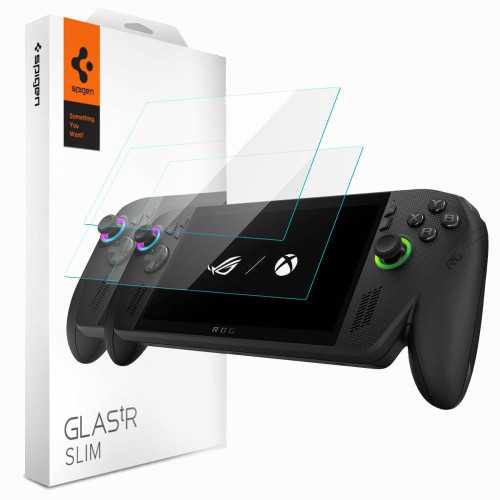
Description
Spigen Glas.tR Slim is a tempered glass with a hardness of 9H effectively protecting the screen from scratches caused by keys, coins, and other sharp objects that the console comes into contact with during everyday carrying.
The oleophobic coating minimizes the accumulation of fingerprints and makes it easy to wipe the screen clean. The Anti-Dust Nano Coating layer repels dust, keeping the glass cleaner on a daily basis. Crystal clear transparency preserves natural colors, image sharpness, and display brightness without any compromises. The glass does not affect the sensitivity and responsiveness of the touchscreen – console operation remains just as smooth as without the film.
Spigen Glas.tR Slim is a proven solution for gamers who want to take care of their console display without losing image quality or touch comfort.
Product Features
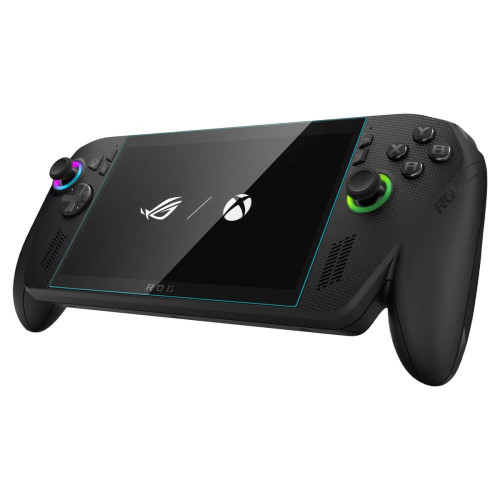
- 100% Original
- Packaged in original packaging
- Hardness 9H
- Oleophobic coating
- Anti-Dust Nano Coating
- Crystal clear transparency
- Does not affect the sensitivity and responsiveness of the touchscreen
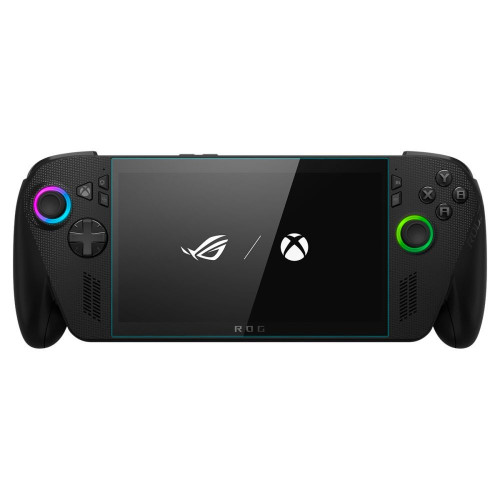
- Precise fit to the screen
Specification
| Model | Glas.tR Slim |
| Compatibility | ROG Xbox Ally X (2025) / ROG Xbox Ally (2025) / ROG Ally X (2024) / ROG Ally (2023) / MSI Claw 7 AI+ |
| Type | Tempered glass |
| Hardness | 9H |
| Coating | Oleophobic + Anti-Dust Nano Coating |
| Quantity in the set | 2 pcs. |
| Dimensions | 164.45 × 105.72 mm |
| Variant | Clear / Transparent |
The set includes
- 2 × Tempered glass Spigen Glas.tR Slim
- 2 × Installation kit (cloth, dust removal sticker, squeegee)
Installation Instructions
1. Start the installation in the bathroom right after a shower – the steam will absorb all the dust from the atmosphere and it will not interfere with your installation.
2. Clean and degrease the surface of the screen thoroughly, then polish it to a shine with a dry cloth.
3. Install the coating as evenly as you can – you can position it using two strips of tape, sticking them to the side of the device.
4. Remove air bubbles by pressing down firmly in circular motions for several seconds. Do this so that the adhesive layer bonds to the screen as strongly as possible.
Price
€17,85Rating







Description
Description
Spigen Glas.tR Slim is a tempered glass with a hardness of 9H effectively protecting the screen from scratches caused by keys, coins, and other sharp objects that the console comes into contact with during everyday carrying.
The oleophobic coating minimizes the accumulation of fingerprints and makes it easy to wipe the screen clean. The Anti-Dust Nano Coating layer repels dust, keeping the glass cleaner on a daily basis. Crystal clear transparency preserves natural colors, image sharpness, and display brightness without any compromises. The glass does not affect the sensitivity and responsiveness of the touchscreen – console operation remains just as smooth as without the film.
Spigen Glas.tR Slim is a proven solution for gamers who want to take care of their console display without losing image quality or touch comfort.
Product Features
- 100% Original
- Packaged in original packaging
- Hardness 9H
- Oleophobic coating
- Anti-Dust Nano Coating
- Crystal clear transparency
- Does not affect the sensitivity and responsiveness of the touchscreen
- Precise fit to the screen
Specification
| Model | Glas.tR Slim |
| Compatibility | ROG Xbox Ally X (2025) / ROG Xbox Ally (2025) / ROG Ally X (2024) / ROG Ally (2023) / MSI Claw 7 AI+ |
| Type | Tempered glass |
| Hardness | 9H |
| Coating | Oleophobic + Anti-Dust Nano Coating |
| Quantity in the set | 2 pcs. |
| Dimensions | 164.45 × 105.72 mm |
| Variant | Clear / Transparent |
The set includes
- 2 × Tempered glass Spigen Glas.tR Slim
- 2 × Installation kit (cloth, dust removal sticker, squeegee)
Installation Instructions
1. Start the installation in the bathroom right after a shower – the steam will absorb all the dust from the atmosphere and it will not interfere with your installation.
2. Clean and degrease the surface of the screen thoroughly, then polish it to a shine with a dry cloth.
3. Install the coating as evenly as you can – you can position it using two strips of tape, sticking them to the side of the device.
4. Remove air bubbles by pressing down firmly in circular motions for several seconds. Do this so that the adhesive layer bonds to the screen as strongly as possible.
Related products
Products you might be interested in


