
Spigen Safe View Apple MacBook Neo 13 2026 Privacy


Description
Product Description
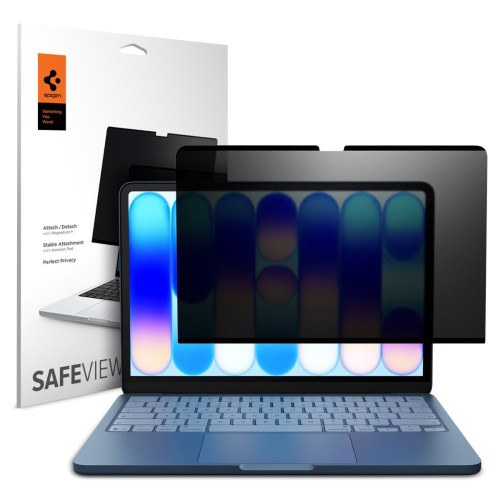
The protective film Spigen SafeView is a privacy filter with a magnetic attachment. Thanks to its innovative adhesive-free mounting system, the film combines the protection of your privacy with the convenience of everyday use and care for the environment.
The darkening filter works effectively from any viewing angle, protecting the screen content from unwanted side glances. Despite the use of privacy technology, the quality of the displayed image remains high – colors are true to life, and the image is clear. With a thickness of only 0.65 mm, the film has virtually no impact on the profile of your MacBook, maintaining its slim silhouette. The precisely made cutout ensures full functionality of the camera and sensors, while the black frame around the film harmoniously blends with the device's design.
The magnetic mounting system makes the installation of the film incredibly simple – just place it on the screen, and the magnets will do their job, without the risk of air bubbles forming. Spigen designs its products with sustainability in mind, which is why the SafeView film can be reused multiple times. The process of regenerating the adhesive layer is straightforward and does not require specialized tools – just rinse the film with clean water and dry it thoroughly before reattaching.
Product Features

- 100% Original
- Packaged in original packaging
- Privacy filter
- Magnetic mounting system
- Reusable
- Precise cutouts for the camera
- Maintains image quality
- Black frame matched to the device
Specifications
| Type | Magnetic privacy film |
| Dimensions | 292.38 x 186.74 x 0.73 mm |
| Compatibility | Apple MacBook Neo 13 2026 |
| Models | A3404 |
Package Includes
- 1 × Spigen SafeView protective film
- 1 × Installation kit
Installation Instructions

- Thoroughly clean the MacBook screen of dust and fingerprints using the included cloth.
- Remove the protective film from the adhesive surface of the Spigen SafeView filter.
- Place the MacBook in an open position on a flat surface.
- Align the filter with the top edge of the screen, matching it with the device's frame.
- Let the magnets do their work – the filter will adhere to the screen in the perfect position.
- Gently smooth the film from the center to the edge to remove any air bubbles.
Price
€35,46Express Checkout 1-Click







Description
Product Description
The protective film Spigen SafeView is a privacy filter with a magnetic attachment. Thanks to its innovative adhesive-free mounting system, the film combines the protection of your privacy with the convenience of everyday use and care for the environment.
The darkening filter works effectively from any viewing angle, protecting the screen content from unwanted side glances. Despite the use of privacy technology, the quality of the displayed image remains high – colors are true to life, and the image is clear. With a thickness of only 0.65 mm, the film has virtually no impact on the profile of your MacBook, maintaining its slim silhouette. The precisely made cutout ensures full functionality of the camera and sensors, while the black frame around the film harmoniously blends with the device's design.
The magnetic mounting system makes the installation of the film incredibly simple – just place it on the screen, and the magnets will do their job, without the risk of air bubbles forming. Spigen designs its products with sustainability in mind, which is why the SafeView film can be reused multiple times. The process of regenerating the adhesive layer is straightforward and does not require specialized tools – just rinse the film with clean water and dry it thoroughly before reattaching.
Product Features
- 100% Original
- Packaged in original packaging
- Privacy filter
- Magnetic mounting system
- Reusable
- Precise cutouts for the camera
- Maintains image quality
- Black frame matched to the device
Specifications
| Type | Magnetic privacy film |
| Dimensions | 292.38 x 186.74 x 0.73 mm |
| Compatibility | Apple MacBook Neo 13 2026 |
| Models | A3404 |
Package Includes
- 1 × Spigen SafeView protective film
- 1 × Installation kit
Installation Instructions
- Thoroughly clean the MacBook screen of dust and fingerprints using the included cloth.
- Remove the protective film from the adhesive surface of the Spigen SafeView filter.
- Place the MacBook in an open position on a flat surface.
- Align the filter with the top edge of the screen, matching it with the device's frame.
- Let the magnets do their work – the filter will adhere to the screen in the perfect position.
- Gently smooth the film from the center to the edge to remove any air bubbles.
Related products
Products you might be interested in


